
Collect missing learner information directly through your school's mobile app using fields already configured for website sign-up. With Mobile Profile Completion, you can ask learners to provide additional information after signing up or logging in and decide whether completing their profile is optional or required before accessing the app.
In this guide, you'll learn how to configure mobile profile completion, manage the settings, and understand what learners experience.
 Mobile app version: 4.10 or later, on iOS and Android.
How mobile profile completion works
Mobile Profile Completion uses the existing sign-up fields configured for your school. Select which fields appear in the mobile app, customize the introductory message, and choose how learners complete them.
Three options are available:
| Setting | What happens |
|---|---|
| Off | Profile completion is disabled, and learners are not prompted to provide additional information. |
| Optional | Learners see a one-time invitation to complete missing fields, which they can dismiss. |
| Required before app access | Learners must complete missing required fields before accessing the app, but can skip optional fields. |
Each field's required or optional status is inherited from your school's website sign-up settings. You cannot change whether a field is required directly from the mobile profile completion settings.For example, if you select a required Country field and an optional Job title field, learners in Required mode must provide their country before accessing the app, but can skip their job title.
Set up mobile profile completion
To enable and configure the feature:
- Navigate to Mobile app → App settings → Authentication → Profile completion.
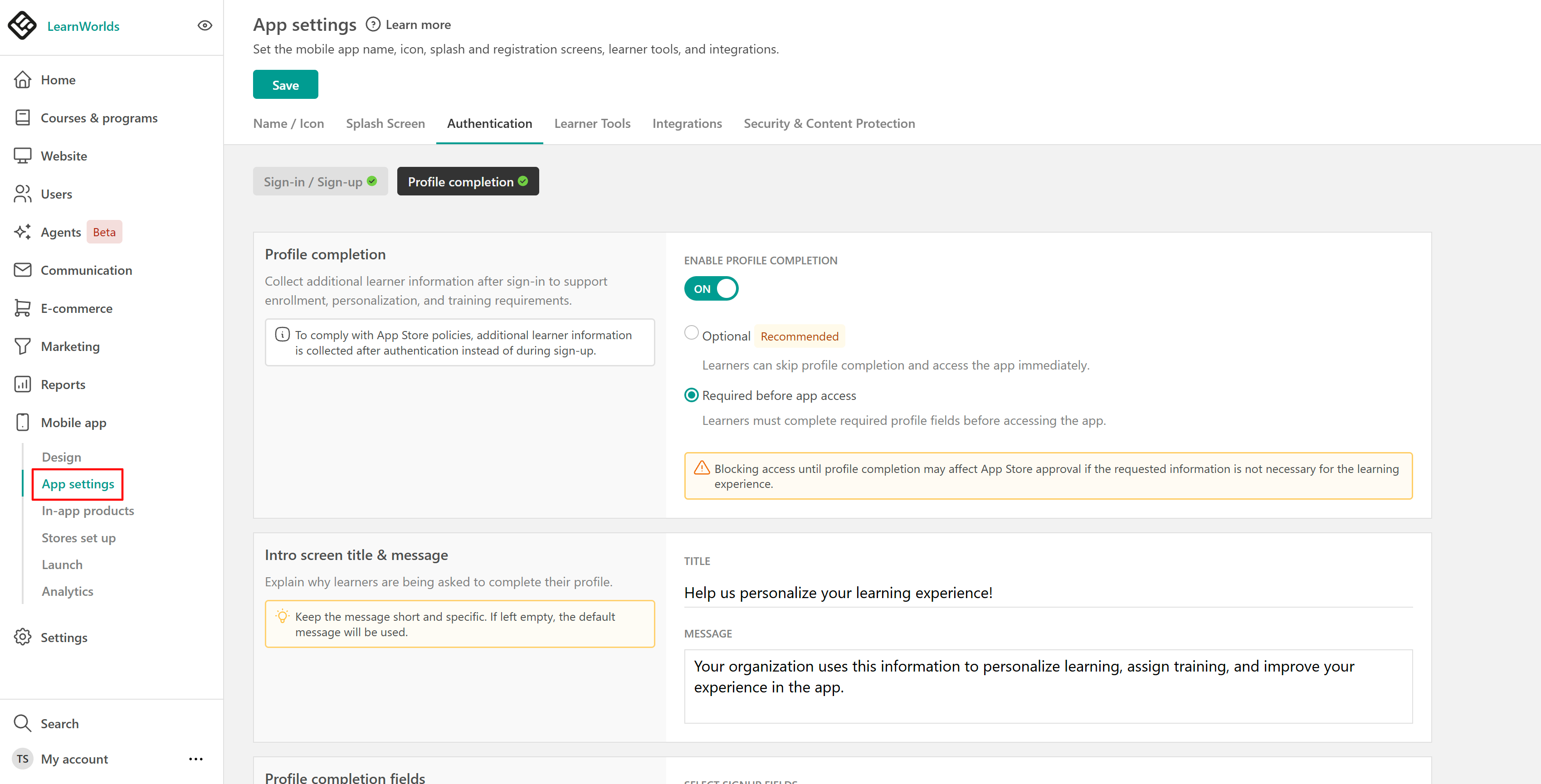
- Select the completion mode:
- Optional: Allow learners to dismiss the profile completion prompt and access the app.
- Required before app access: Require learners to complete missing required fields before entering the app.
- Enter an introductory message explaining why you're requesting the information.
- Select the existing sign-up fields you want learners to complete.
- Review the learner preview to see how the introduction and fields will appear in the mobile app.
- Select Save.
What learners experience
The profile completion flow appears after learners sign up or log in to the mobile app, depending on the mode you've selected and whether they're missing information.
Optional mode
When Optional mode is enabled, learners with missing selected fields see a one-time invitation to complete their profiles.
They can either:
- Complete the requested information and continue to the app.
- Select X to dismiss the prompt and access the app without completing the fields.
If learners dismiss the prompt, it won't automatically appear again on subsequent app launches or logins.
Adding new fields while remaining in Optional mode won't trigger the prompt again for learners who have already dismissed it. They can still update their information through their profile in the app.Required before app access
When Required before app access is enabled, learners must complete any missing required fields before entering the app.
- Required fields must be completed.
- Optional fields can be skipped.
- Learners can sign out and return later without losing previously submitted answers.
When learners return, they must complete any remaining required fields before accessing the app.
This also applies to existing learners who are missing information from the selected required fields.
Manage your mobile profile completion settings
You can update the completion mode, introductory message, or selected fields at any time.
- Navigate to Mobile app → App settings → Authentication → Profile completion.
- Review or update your settings.
- Use the learner preview to check how the changes will appear.
- Select Save.
What happens when you change the settings?
| Change | What happens |
|---|---|
| Add a required field | In Required mode, learners missing that field must complete it on their next app launch or login. |
| Add fields in Optional mode | Learners who previously dismissed the one-time prompt won't be prompted again. |
| Switch from Optional to Required | Learners who previously dismissed the prompt must complete any missing required fields. |
| Update the introductory message | The new message appears the next time learners are shown the flow. |
| Remove a field | The field no longer appears in the mobile profile completion flow. |
| Disable the feature | Learners no longer see profile completion prompts. |
Previously submitted answers remain saved when you change settings, remove fields, or disable the feature.
Disable mobile profile completion
To stop showing profile completion prompts:
- Navigate to Mobile app → App settings → Authentication → Profile completion.
- Select Off.
- Select Save.
Learners will no longer see the profile completion flow. Any information they've already submitted remains saved in their profiles.
Important considerations
Keep the following in mind when configuring Mobile Profile Completion:
- Existing learners: The feature applies to both new and existing learners who are missing selected information.
- Required fields: Field requirements are inherited from your website sign-up settings and cannot be overridden in the mobile app.
- Optional prompts: Learners who dismiss the Optional flow won't be prompted again automatically while the school remains in Optional mode.
- Multiple academies: Configure Mobile Profile Completion separately for each academy. Settings are not synchronized through School Sync.
- Website sign-up: Enabling this feature doesn't change your school's existing website sign-up process.
- App Store approval: Requiring learners to complete profile information before accessing the app may affect App Store approval.
In mobile app version 4.10, the feature doesn't support conditional fields, different completion rules for specific learner groups, or recurring profile completion requests.
Frequently asked questions
1. Can learners skip mobile profile completion?
In Optional mode, learners can dismiss the prompt and access the app. In Required mode, they must complete missing required fields but can skip optional ones.
2. Will learners see the Optional prompt again if they dismiss it?
No. The Optional prompt appears only once. Adding new fields while remaining in Optional mode won't display it again for learners who have already dismissed it.
3. Can I make a field required only in the mobile app?
No. A field's required status comes from your website sign-up settings. To change it, update the field configuration there.
4. What happens if learners close the app before completing their profiles?
Previously submitted answers remain saved. In Required mode, learners must complete their remaining required fields before accessing the app when they return.
5. Does mobile profile completion apply to existing learners?
Yes. Existing learners with missing selected fields follow the configured completion mode. In Required mode, they must complete any missing required fields before accessing the app.