
The LearnWorlds Course Hub allows you to list your courses so other LearnWorlds schools can license and resell them. As a Hub Publisher, you earn revenue whenever Buyers enroll learners into your licensed courses.
In this guide, you’ll learn how payouts work, how billing cycles are calculated, how refunds are handled, and how LearnWorlds commissions are applied.
Connecting Stripe
The first step as a Hub Publisher is to connect your Stripe account. Without it, you won’t be able to add courses to the Course Hub library.
To connect your Stripe account navigate to Courses & Programs → Course Hub → Settings → Connect Stripe account.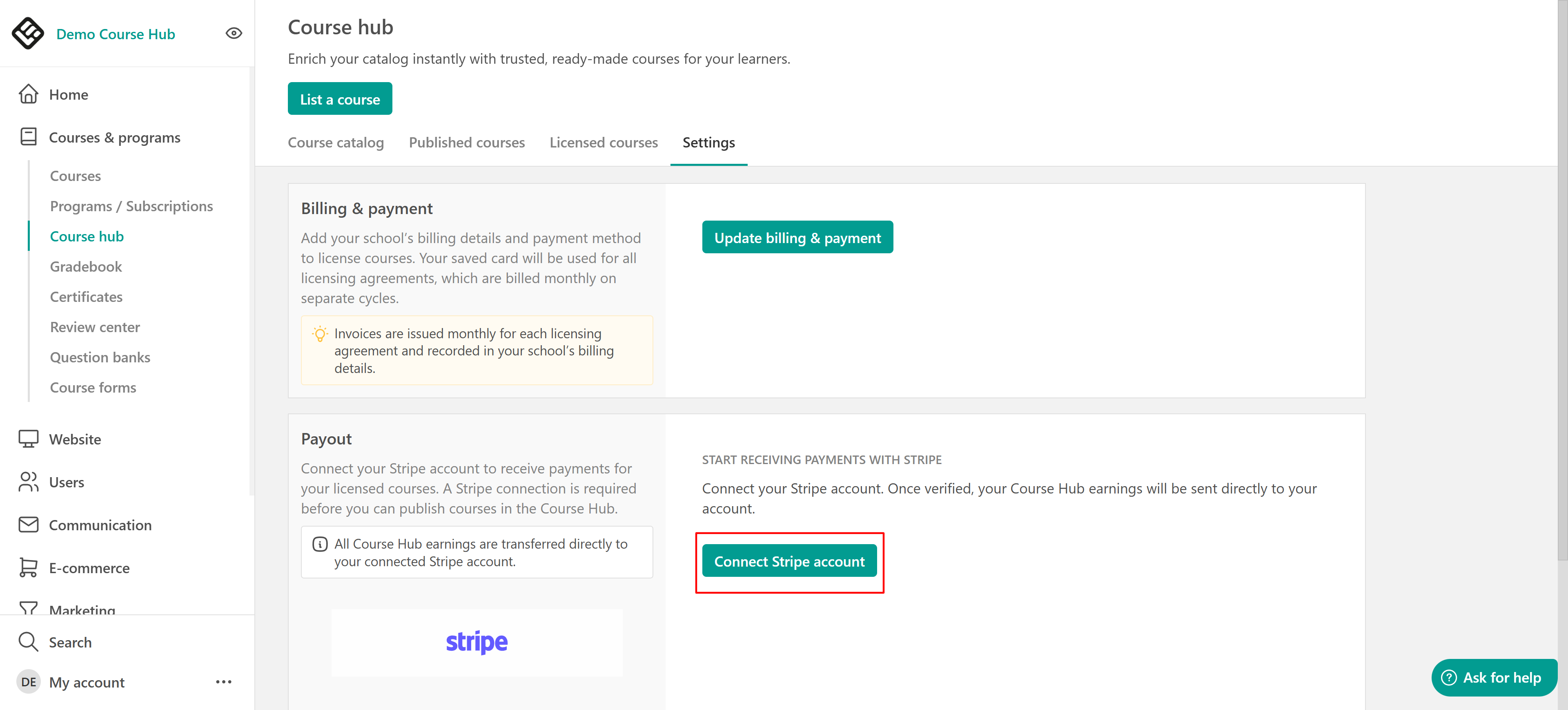
We recommend creating a separate Stripe account dedicated to the Course Hub, even if you already use Stripe for your school. This helps you keep Course Hub transactions separate and easier to manage. This allows you to:
- Keep Course Hub transactions separate from your main business activity
- Maintain cleaner financial records (customers, products, payouts)
- Avoid accidental changes that could impact licensing agreements

- Stripe is required before submitting a course for review and publishing it. However, you can still create Course Hub listings and save them as draft without connecting Stripe.
- You can disconnect your Stripe account only if your school has no active licensing agreements as a Hub Publisher.
- Disconnecting Stripe will immediately unpublish all your Course Hub listings.
How publisher payments work
Hub Publisher revenue is generated through enrollment-based pricing. This means:
- You define a license fee per enrollment
- Buyers are charged when they enroll learners into your course
- Your revenue is collected through Stripe based on billable enrollments
Your earnings depend only on the license fee you set. The Buyer’s selling price and profit margin do not affect what you earn.
All Course Hub transactions are processed through Stripe. Stripe may apply processing fees depending on the Buyer’s payment method and the Publisher’s Stripe account configuration. LearnWorlds does not control Stripe processing fees.Billing cycles & interim charges
Buyer billing is calculated in 30-day billing cycles, per licensing agreement. At the end of each billing cycle, Stripe charges the Buyer based on the total number of billable enrollments created during that period.
If enrollment fees exceed $1,000 (Interim charges) during an active billing cycle, an interim charge is triggered automatically. This interim charge:
- Happens mid-cycle
- Does not reset or affect the 30-day billing schedule
- Helps prevent large outstanding balances
The regular billing cycle continues as normal after the interim charge.
Taxes & pricing responsibility
The license fee you set in the Course Hub is the gross amount per enrollment, and it must be tax-inclusive. This means:
- Buyers always pay the full amount you set (in USD).
- You are responsible for calculating and managing any applicable taxes (e.g. VAT), depending on your country and the Buyer’s country.
- LearnWorlds does not calculate, withhold, or remit taxes on your behalf.
If you require invoicing or tax documentation for these transactions, you are responsible for handling it through your own accounting process.
Handling refunds
Refunds depend on whether the Buyer invoice has already been paid.
- Invoice not yet paid
If an enrollment is included in an upcoming invoice that has not been paid yet, the Publisher may approve the removal before billing occurs.
- Invoice already paid
If the invoice has already been paid, a refund can be issued only with the Publisher’s approval and must be processed through Stripe.
Stripe processing fees are not refunded.LearnWorlds commission
Each month, LearnWorlds calculates a combined commission invoice for each school, which includes:
- Hub Publisher-side commissions: Based on revenue from courses your school offers.
- Buyer-side commissions: Based on enrollments in courses your school has licensed.
To support the platform and marketplace operations, LearnWorlds applies a 10% commission on revenue generated through the Course Hub.
The commission is not deducted upfront.
Instead:
- The Hub Publisher receives the full amount paid by the Buyer through Stripe
- LearnWorlds issues a separate commission invoice
ExampleIf your course price is $20 per enrollment and a Buyer enrolls 25 learners, the total revenue is: $20 × 25 = $500
- You (publisher) receive $500 in your Stripe account
- LearnWorlds sends a separate invoice for the 10% commission ($50)
Failed buyer payments & restrictions
If a Buyer fails to pay a Course Hub invoice, their school may be marked as a non-paying customer and restrictions are applied immediately. These restrictions include:
- New enrollments into licensed courses are blocked
- New course licensing is blocked
- Previewing and editing course layout may be disabled
Billing for active licensing agreements may still continue during the restriction period. To restore access, the Buyer must complete payment, and LearnWorlds must manually lift the restrictions. If payment is not cleared within 15 days, further action may be taken.
Revenue & sales tracking
Hub Publishers can track Course Hub performance from the Published Courses page. From the Published Courses table, you can view:
- Number of schools that licensed each course
- Price per enrollment
- Total enrollments
- Gross revenue generated
These insights help you identify top-performing listings and optimize your pricing or positioning over time.