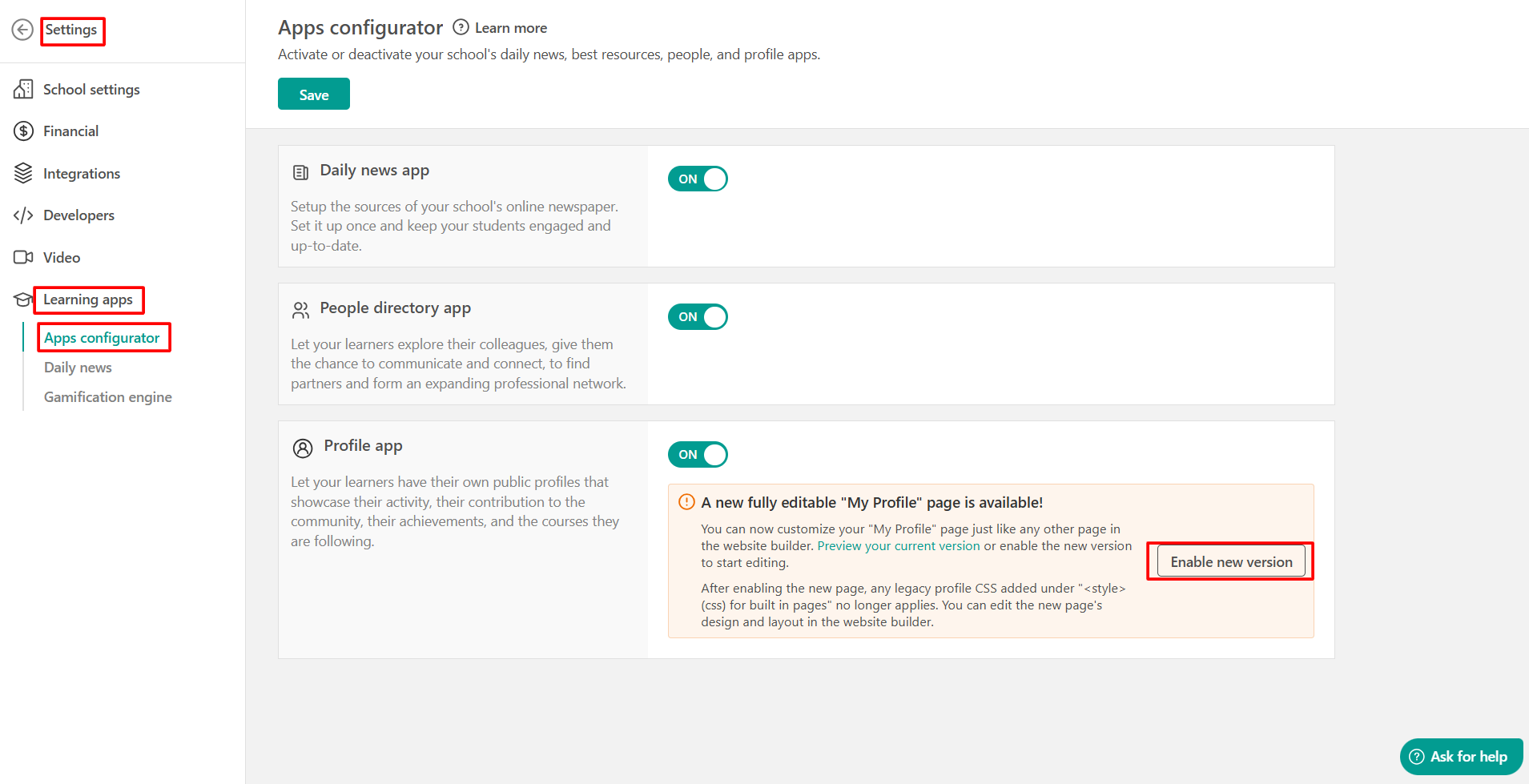
The LearnWorlds Learning Apps are tools that assist you in developing your school and are included in all our plans. The Learning Apps offered in LearnWorlds are the:
- Daily News: The Daily News option allows instructors/authors to curate their own newspaper using RSS feeds, selecting and declaring any desired number of feeds through the authoring environment.
- People Directory: In LearnWorlds, users can view, follow, and contact other users and visit their profiles. Activating the People Directory app enables the People page for users to access.
- Profile: Similar to other social networks, each user (whether they're an admin, instructor, or learner) within your school has a personal Profile page that's accessible to all school users upon logging in.
The Daily News, People, and Profile apps can be activated or deactivated via the Apps Configurator. Navigate to Settings → Learning apps, to view your available choices and activate and deactivate your LearnWorlds apps under Apps configurator.


- Schools created before April 2024 also see the Best Resources option. It is an organized library of links/resources you can share with your users. If you want to create yours, click here to check the steps.
- There is a new version of the My Profile page that can be customized and edited from the Admin view. If you are using an older version, you will see the option to switch to the new one. To start using the updated version, click Enable new version.
For more details, check this guide.