
All courses submitted to the LearnWorlds Course Hub go through a review process before they can be published in the catalog. This ensures that courses meet quality standards, follow Course Hub technical requirements, and work smoothly for Buyers who will license and resell them.
In this guide, you’ll learn how the review process works, what the Course Hub team checks, and how to prepare your course and listing to improve your chances of approval.
How the Course Hub review process works
After you finish the Course Hub wizard and submit your course, your listing enters the review workflow. Your course can have the following review statuses:
- Draft: Not submitted yet. Fully editable.
- In review: Submitted to LearnWorlds. Editing is locked
- Published: Approved and visible in the Course Hub catalog.
- Rejected / Changes required: Requires fixes before approval.
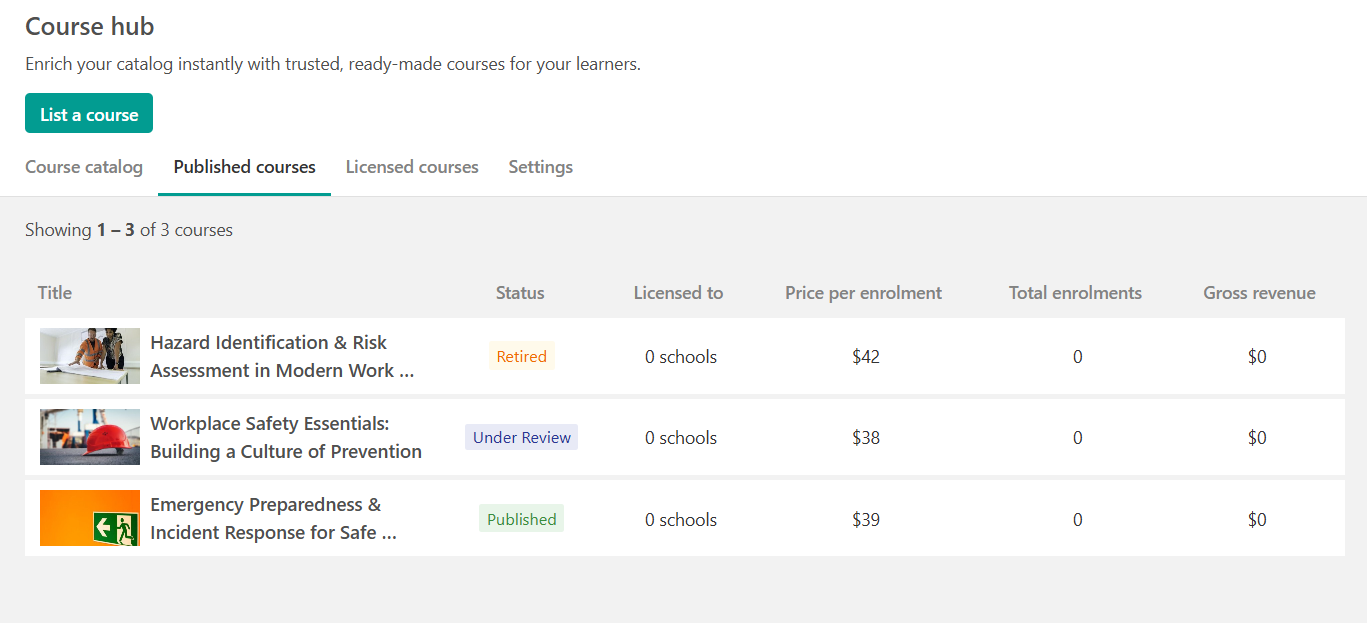
Once the review is complete, you will receive an email notification with the outcome.
What the Course Hub team reviews
The review process focuses on two key areas:
1. Listing quality
Your listing must clearly explain:
- What the course covers
- Who it is for
- What learners will gain
Buyers rely heavily on your listing, since they cannot edit your content.
2. Course content compatibility
Your course must be standalone and reusable in another school. Since Buyers cannot modify course content, your course should work “as-is” without relying on your academy setup, external systems, or promotions.
What makes a course more likely to be approved
To improve your approval chances, make sure your course is:
- Clear and professional
- Use an outcome-focused course title
- Write a strong description and course overview
- Avoid exaggerated marketing claims - Resale-ready: Your Course Hub version must be resale-ready and white-label. This means it should not display strong Publisher branding such as:
- Logos or academy names inside the course content
- Instructor-branded intro/outro slides
- Contact details (email, website, social media)
- References to your academy, coaching program, or community
- External promotions or cross-sells
It’s not just about removing a logo. The entire course experience should feel neutral and transferable, so Buyers can license and resell it under their own brand without friction.
Think of your Course Hub version as a clean, unbranded edition of your course, fully functional, professional, and ready to be delivered by another school.
- Easy to evaluate
- Include a high-quality cover image
- Add a short preview video (recommended)
Common reasons courses fail review
Courses are often rejected or returned for revisions when they include unsupported features or content that is not portable. Unsupported features (must be removed). Your Course Hub version must not include:
- live sessions (webinars, coaching calls, live classes)
- drip feed schedules
- password-protected activities
- external video hosting (e.g. Vimeo or external Wistia embeds)
- third-party certificate providers (Accredible, Credly)
- LTI embedded content
- synced imported activities or synced sections
All videos must be hosted on LearnWorlds.
External links and promotional content
Course Hub courses must be standalone and neutral. This means you should not include:
- Links to your school or website
- Links to paid products, gated content, or sign-up pagea
- Affiliate links
- Promotional messages or “upsells”
Links to free educational resources (such as public articles or tools) are allowed, as long as they support learning outcomes.
AI-generated content
You may use AI tools to support course creation, but your course must still feel professional, accurate, and clearly guided by your expertise.
Courses that appear fully AI-generated, generic, or poorly structured may be rejected.
Topic selection and marketplace fit
Even if your course meets technical requirements, it may not be approved if:
- The topic is already heavily saturated in the Course Hub
- The course does not offer clear differentiation or added value
Before submitting, we recommend browsing the Course Hub catalog to see what already exists and how your course stands out.
What happens if revisions are required?
If the Course Hub team requests changes:
- Your listing will remain unpublished
- You will receive feedback with the exact items to fix
- Once updates are complete, you can resubmit for review
Best practice before submitting
Before submitting, check that your course:
- Works independently in another school
- Includes no unsupported activities or settings
- Contains no promotional or branded content
- Has a complete listing (title, description, overview, media)
A well-structured, professional course with clear outcomes is much more likely to be approved quickly.