
Availability
Starter
Pro Trainer
Learning Center
High Volume & Corporate
In your LearnWorlds school, you have the option to sell your courses individually as one-off payments or through subscriptions. If you prefer to sell your courses exclusively through subscriptions and not as one-off payments, you can configure this in your financial settings. Below are the steps to enable this setting.
1. Navigate to Settings → Financial → Payment Gateway.
2. Connect the Stripe Payment Gateway.
3. Enable the Subscriptions only setting and click save. A notification message will appear at the bottom right corner.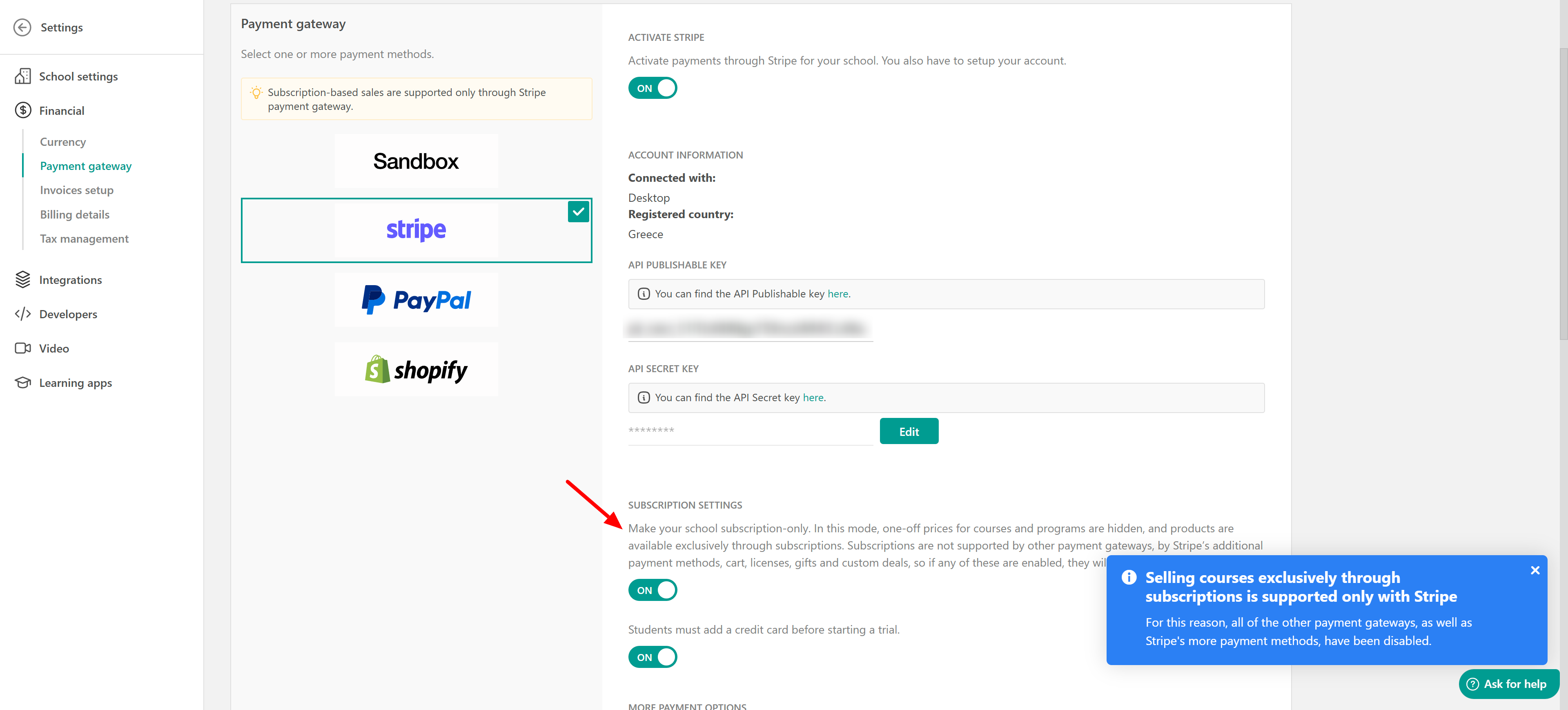

- Subscriptions are supported only via Stripe in your LearnWorlds school; hence you cannot have multiple payment gateways with a subscription-only school.
- If you make your school subscription-only, one-off prices for courses and programs are hidden, and products are available exclusively through subscriptions.
- While on a subscription-only school, you cannot use cart, licenses, gifts, and custom deals, so if any of these are enabled, they will be automatically deactivated.
- The Automatic Enrollment buttons on the individual Layout Pages will be dynamically converted from Enroll to Subscribe and will redirect users to the subscription payment page.
- If you have Free types of courses, users can register for them individually, as they are free and accessible to any user.
- To check how to show your subscriptions on your pages, click here.
- If a school switches to a subscription-only model, users currently paying in installments will continue to be charged.