


In LearnWorlds, you can assign different User Roles, Administrative, Instructional, Reporting, or Management, to manage access and delegate responsibilities.
Instructional roles, such as Instructor, help distribute course-related tasks. Instructors can create and manage courses, upload content, and interact with students in their assigned courses.
Add an instructor
1. Navigate to Users → User Roles and click on Instructors.
2. Click Add Instructor.

2. In the popup that appears:
a. Add the Username of the Instructor.
b. Add the email.
c. Assign the "Instructor" role.
Note: Only the Instructor Role can be selected in the Pro Trainer plan. For our Learning Center plans or higher, you can assign a predefined or custom-created instructional role with certain permissions. If you want more information, check this article.
d. Assign the Courses from the drop-down menu.
 If the instructional level assigned role has the permission to “Create a course” then it is not mandatory to assign courses to this user. The user with the “Create a course” permission is auto-assigned (with 0% commission) to all the courses they will create.
e. If the instructor gets a share of the course revenue, you can specify their percentage. Otherwise, you can leave the field empty.
f. Add tags, if needed, to organize your Users better.
g. Allow Marketing Cookies or not, depending on your GDPR settings.
h. Choose whether to apply validation rules, based on your Sign-up settings.
3. Click Add Instructor.
- You can also update a user while assigning the Instructor Role.
- An activation e-mail will be sent automatically to the new user, asking them to set up a password for the account.
- Multiple instructors can be assigned to a single course, but each instructor can only edit their own video uploads. All instructors can view statistics and edit video learning activities.
Assign a new course to an instructor
There may be a case where you would like to assign new courses to an existing instructor.
1. Navigate to Users → All users, hover over Manage on the instructor you wish, and click Edit User.
2. Navigate to Users → User Roles, and click on Instructional. Hover over the three dots next to the instructor you wish, and click Edit User.
In the popup that appears, click on Add another course under Assigned Courses to add a new course or click on the bin if you wish to remove a course.

Schools with the Learning Center plans or higher can also change the Instructor role to a different predefined or custom one under the User Role field.Manage instructors
From the Instructional Tab, you can view:
1. Current Instructors.
2. Their assigned role.
3. Last login date.
4. Assigned courses.
5. Management options (e.g., delete, reset password). If you want more information, check this article.
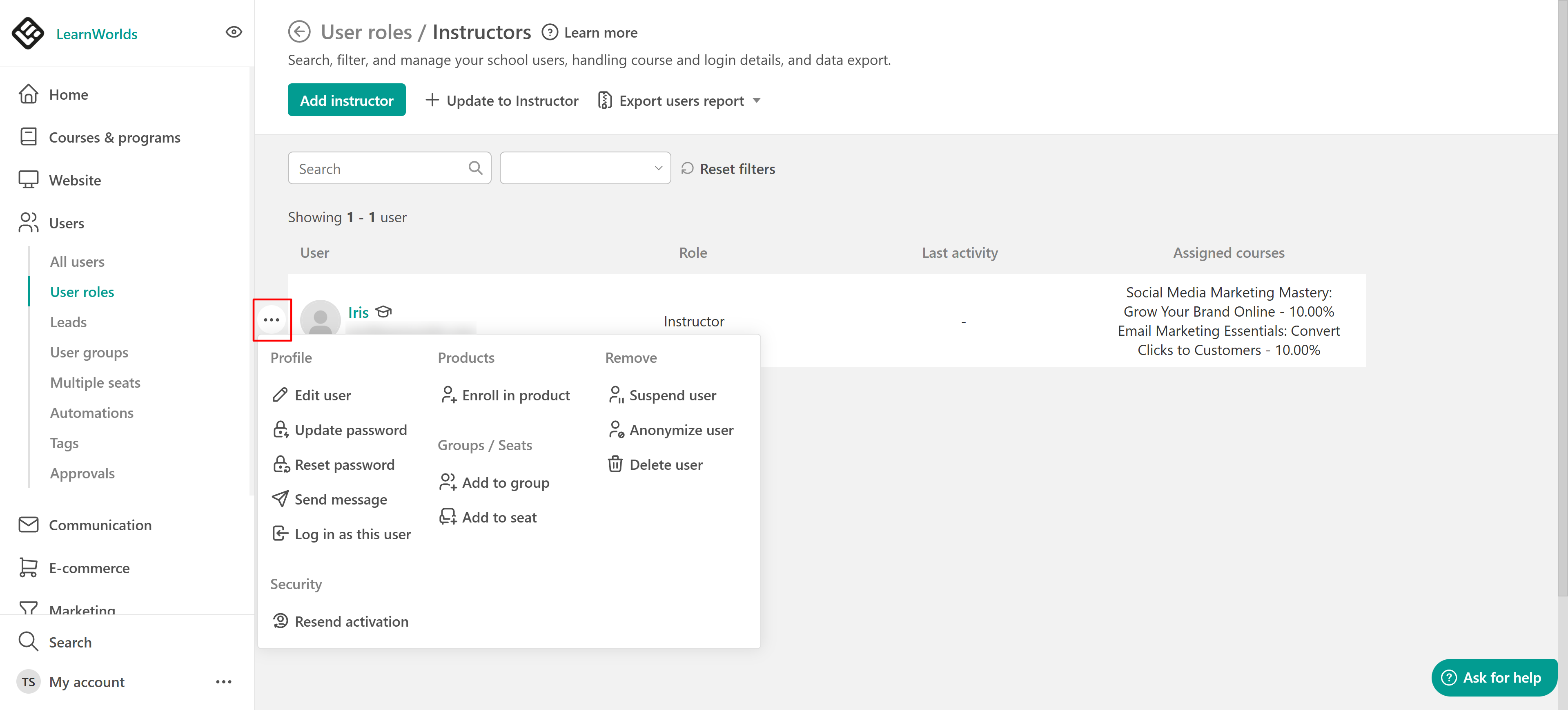
Only the Instructor Role can be selected in the Pro Trainer plan. Assigning a predefined or custom-created Instructional Role with certain permissions for our Learning Center plans or higher is feasible. For more information, check this article.Unassign instructors
If you want to unassign an instructor, navigate to Users → All Users → Edit User and change the User Role to a different one (e.g., user). For more information, check the steps in this article.
Instructor revenue & commissions
LearnWorlds automatically calculates instructor revenue based on the assigned percentage and the final price of the product (after taxes). However, payouts are handled outside the platform.
Commissions for instructors are calculated upon enrollment as follows:
- Courses
- Learning Programs
- Bundle Offers
- Subscriptions
- Installment plans (Payment plans)
For programs (either one-off, installment plans, or subscriptions) and bundle offers, instructor commissions are calculated per individual course included in the offer, and only for the courses assigned to the instructor. Here is an example to better illustrate this:
Let's assume that you have a bundle offer X, and its price is $120. If a user purchases this offer, they can access courses A, B, and C.
For bundle offers and learning programs sold via subscriptions or installment plans, instructor commissions are calculated per individual course included in the offer and are applied to each successful payment. This means that instructors receive their commission every time a subscription renewal or installment payment is completed, based on the proportional value of the courses they are assigned to
- LearnWorlds calculates the instructor's revenue based on the instructor's percentage fee and on the final price of a course, after taxes, and no automated payment will take place from within the platform. You will have to handle the payments outside of the platform.
- Instructors do not receive a share of revenue from enrollments in seat offerings.
- If no revenue is assigned to the instructor, they will not receive a notification about the purchase (when the respective setting is enabled).
Instructional role permissions
There are available permissions that an Instructional role can have in your school (available for Pro trainer plans or higher). The permissions are available only for the courses that are assigned to each instructor.

For schools with subscription / installment payments before June 2nd, 2025:With the release of our new platform version, instructor commissions for subscriptions and installment plans are now calculated on every subscription or installment payment.
However, for customers who were already using instructors for subscriptions and installment plans before the new platform release, we have kept the previous behavior after migrating them from the legacy to the new platform version, to avoid changing any commission agreements you may have in place with your instructors. Under this legacy setup:
- Installment plans: Only the first payment includes a commission.
- Subscriptions: No commission is applied.
If you would like to switch to the new behavior and calculate a commission for every payment, you can reach out to our Support team to have this enabled for your account.